swag 🌍 English ∙ 简体中文
Swag 将 Go 的注释转换为 Swagger2.0 文档。我们为流行的 Go Web Framework 创建了各种插件,这样可以与现有 Go 项目快速集成(使用 Swagger UI)。
目录
快速开始
将注释添加到 API 源代码中,请参阅声明性注释格式。
使用如下命令下载 swag:
1 go install github.com/swaggo/swag/cmd/swag@latest
从源码开始构建的话,需要有 Go 环境(1.19 及以上版本)。
或者从 github 的 release 页面下载预编译好的二进制文件。
在包含 main.go 文件的项目根目录运行 swag init。这将会解析注释并生成需要的文件(docs 文件夹和 docs/docs.go)。
确保导入了生成的 docs/docs.go 文件,这样特定的配置文件才会被初始化。如果通用 API 注释没有写在 main.go 中,可以使用 -g 标识符来告知 swag。
1 swag init -g http/api.go
(可选) 使用 fmt 格式化 SWAG 注释。(请先升级到最新版本)
swag cli 1 2 3 4 5 6 7 8 9 10 11 12 13 14 15 16 17 18 19 20 21 22 swag init -h NAME: swag init - Create docs.go USAGE: swag init [command options] [arguments...] OPTIONS: --generalInfo value, -g value API通用信息所在的go源文件路径,如果是相对路径则基于API解析目录 (默认: "main.go" ) --dir value, -d value API解析目录 (默认: "./" ) --exclude value 解析扫描时排除的目录,多个目录可用逗号分隔(默认:空) --propertyStrategy value, -p value 结构体字段命名规则,三种:snakecase,camelcase,pascalcase (默认: "camelcase" ) --output value, -o value 文件(swagger.json, swagger.yaml and doc.go)输出目录 (默认: "./docs" ) --parseVendor 是否解析vendor目录里的go源文件,默认不 --parseDependency 是否解析依赖目录中的go源文件,默认不 --parseDependencyLevel, --pdl 对'--parseDependency' 参数进行增强, 是否解析依赖目录中的go源文件, 0 不解析, 1 只解析对象模型, 2 只解析API, 3 对象模型和API都解析 (default: 0) --markdownFiles value, --md value 指定API的描述信息所使用的markdown文件所在的目录 --generatedTime 是否输出时间到输出文件docs.go的顶部,默认是 --codeExampleFiles value, --cef value 解析包含用于 x-codeSamples 扩展的代码示例文件的文件夹,默认禁用 --parseInternal 解析 internal 包中的go文件,默认禁用 --parseDepth value 依赖解析深度 (默认: 100) --instanceName value 设置文档实例名 (默认: "swagger" )
1 2 3 4 5 6 7 8 9 10 11 12 13 swag fmt -h NAME: swag fmt - format swag comments USAGE: swag fmt [command options] [arguments...] OPTIONS: --dir value, -d value API解析目录 (默认: "./" ) --exclude value 解析扫描时排除的目录,多个目录可用逗号分隔(默认:空) --generalInfo value, -g value API通用信息所在的go源文件路径,如果是相对路径则基于API解析目录 (默认: "main.go" ) --help , -h show help (default: false )
支持的 Web 框架
如何与 Gin 集成 点击此处 查看示例源代码。
使用 swag init 生成 Swagger2.0 文档后,导入如下代码包:
1 2 import "github.com/swaggo/gin-swagger" import "github.com/swaggo/files"
在 main.go 源代码中添加通用的 API 注释:
1 2 3 4 5 6 7 8 9 10 11 12 13 14 15 16 17 18 19 20 21 22 23 24 25 26 27 28 29 30 31 32 33 34 35 36 37 38 39 40 41 func main () r := gin.Default() c := controller.NewController() v1 := r.Group("/api/v1" ) { accounts := v1.Group("/accounts" ) { accounts.GET(":id" , c.ShowAccount) accounts.GET("" , c.ListAccounts) accounts.POST("" , c.AddAccount) accounts.DELETE(":id" , c.DeleteAccount) accounts.PATCH(":id" , c.UpdateAccount) accounts.POST(":id/images" , c.UploadAccountImage) } } r.GET("/swagger/*any" , ginSwagger.WrapHandler(swaggerFiles.Handler)) r.Run(":8080" ) }
此外,可以动态设置一些通用的 API 信息。生成的代码包 docs 导出 SwaggerInfo 变量,使用该变量可以通过编码的方式设置标题、描述、版本、主机和基础路径。使用 Gin 的示例:
1 2 3 4 5 6 7 8 9 10 11 12 13 14 15 16 17 18 19 20 21 22 23 24 25 26 27 28 29 30 31 32 33 package mainimport ( "github.com/gin-gonic/gin" "github.com/swaggo/files" "github.com/swaggo/gin-swagger" "./docs" ) func main () docs.SwaggerInfo.Title = "Swagger Example API" docs.SwaggerInfo.Description = "This is a sample server Petstore server." docs.SwaggerInfo.Version = "1.0" docs.SwaggerInfo.Host = "petstore.swagger.io" docs.SwaggerInfo.BasePath = "/v2" docs.SwaggerInfo.Schemes = []string {"http" , "https" } r := gin.New() r.GET("/swagger/*any" , ginSwagger.WrapHandler(swaggerFiles.Handler)) r.Run() }
在 controller 代码中添加 API 操作注释:
1 2 3 4 5 6 7 8 9 10 11 12 13 14 15 16 17 18 19 20 21 22 23 24 25 26 27 28 29 30 31 32 33 34 35 36 37 38 39 40 41 42 43 44 45 46 47 48 49 50 51 52 53 54 55 56 57 58 59 60 61 package controllerimport ( "fmt" "net/http" "strconv" "github.com/gin-gonic/gin" "github.com/swaggo/swag/example/celler/httputil" "github.com/swaggo/swag/example/celler/model" ) func (c *Controller) id := ctx.Param("id" ) aid, err := strconv.Atoi(id) if err != nil { httputil.NewError(ctx, http.StatusBadRequest, err) return } account, err := model.AccountOne(aid) if err != nil { httputil.NewError(ctx, http.StatusNotFound, err) return } ctx.JSON(http.StatusOK, account) } func (c *Controller) q := ctx.Request.URL.Query().Get("q" ) accounts, err := model.AccountsAll(q) if err != nil { httputil.NewError(ctx, http.StatusNotFound, err) return } ctx.JSON(http.StatusOK, accounts) }
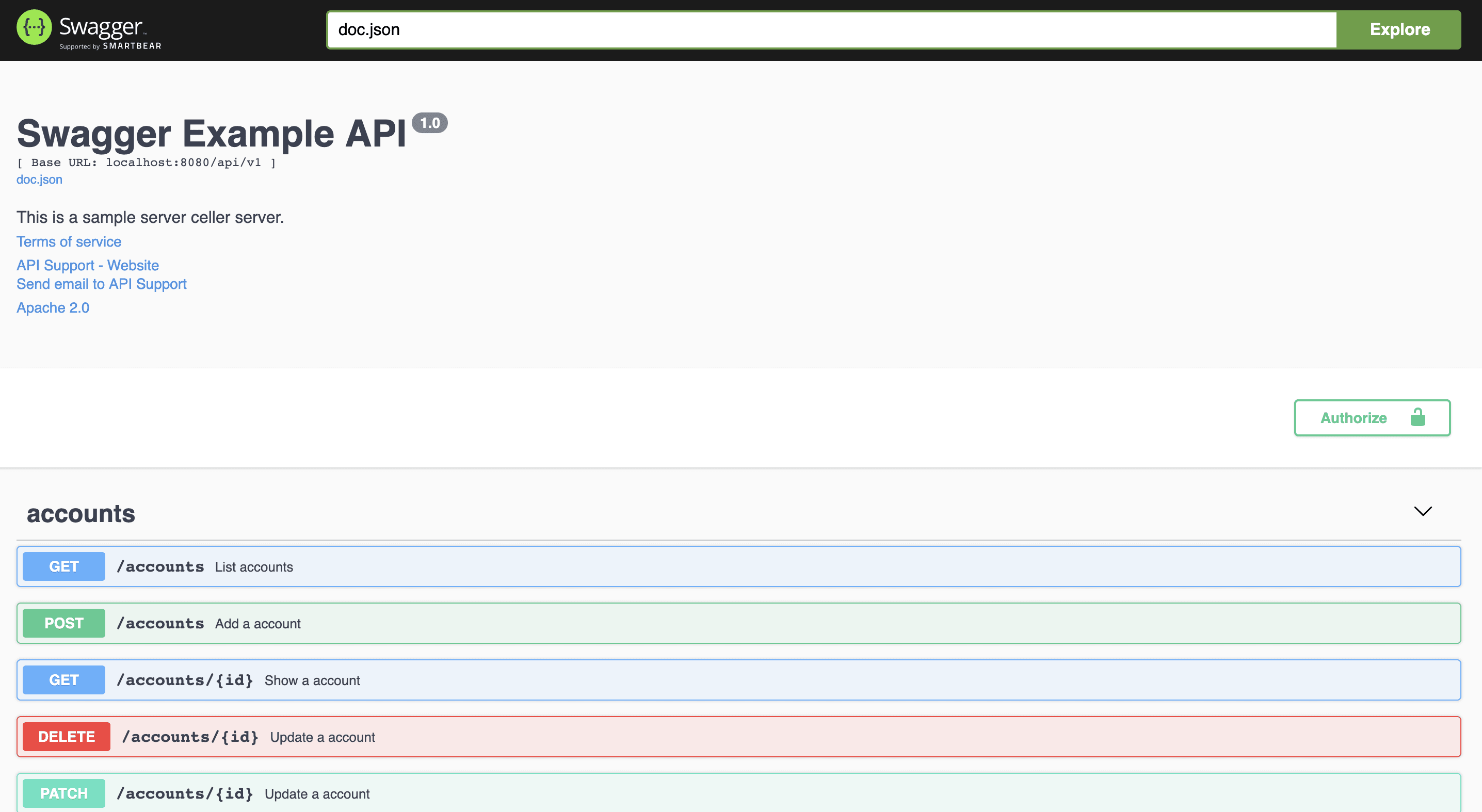
运行程序,然后在浏览器中访问 http://localhost : 8080/swagger/index.html 。将看到 Swagger 2.0 Api 文档,如下所示:
格式化说明 可以针对 Swag 的注释自动格式化,就像 go fmt。here .
示例:
排除目录(不扫描)示例:
1 swag fmt -d ./ --exclude ./internal
开发现状 Swagger 2.0 文档
声明式注释格式 通用 API 信息 示例 celler/main.go
注释
说明
示例
title
必填 应用程序的名称。// @title Swagger Example API
version
必填 提供应用程序 API 的版本。// @version 1.0
description
应用程序的简短描述。
// @description This is a sample server celler server.
tag.name
标签的名称。
// @tag.name This is the name of the tag
tag.description
标签的描述。
// @tag.description Cool Description
tag.docs.url
标签的外部文档的 URL。
// @tag.docs.url https://example.com
tag.docs.description
标签的外部文档说明。
// @tag.docs.description Best example documentation
termsOfService
API 的服务条款。
// @termsOfService http://swagger.io/terms/
contact.name
公开的 API 的联系信息。
// @contact.name API Support
contact.url
联系信息的 URL。 必须采用网址格式。
// @contact.url http://www.swagger.io/support
contact.email
联系人/组织的电子邮件地址。 必须采用电子邮件地址的格式。
// @contact.email support@swagger.io
license.name
必填 用于 API 的许可证名称。// @license.name Apache 2.0
license.url
用于 API 的许可证的 URL。 必须采用网址格式。
// @license.url http://www.apache.org/licenses/LICENSE-2.0.html
host
运行 API 的主机(主机名或 IP 地址)。
// @host localhost: 8080
BasePath
运行 API 的基本路径。
// @BasePath /api/v1
accept
API 可以使用的 MIME 类型列表。 请注意,Accept 仅影响具有请求正文的操作,例如 POST、PUT 和 PATCH。 值必须如“Mime 类型 ”中所述。
// @accept json
produce
API 可以生成的 MIME 类型的列表。值必须如“Mime 类型 ”中所述。
// @produce json
query.collection.format
请求 URI query 里数组参数的默认格式:csv,multi,pipes,tsv,ssv。 如果未设置,则默认为 csv。
// @query.collection.format multi
schemes
用空格分隔的请求的传输协议。
// @schemes http https
externalDocs.description
Description of the external document.
// @externalDocs.description OpenAPI
externalDocs.url
URL of the external document.
// @externalDocs.url https://swagger.io/resources/open-api/
x-name
扩展的键必须以 x-开头,并且只能使用 json 值
// @x-example-key {“key”: “value”}
使用 Markdown 描述 如果文档中的短字符串不足以完整表达,或者需要展示图片,代码示例等类似的内容,则可能需要使用 Markdown 描述。要使用 Markdown 描述,请使用一下注释。
注释
说明
示例
title
必填 应用程序的名称。// @title Swagger Example API
version
必填 提供应用程序 API 的版本。// @version 1.0
description.markdown
应用程序的简短描述。 从 api.md 文件中解析。 这是 @description 的替代用法。
// @description.markdown No value needed, this parses the description from api.md
tag.name
标签的名称。
// @tag.name This is the name of the tag
tag.description.markdown
标签说明,这是 tag.description 的替代用法。 该描述将从名为 tagname.md的 文件中读取。
// @tag.description.markdown
API 操作 Example celler/controller
注释
描述
description
操作行为的详细说明。
description.markdown
应用程序的简短描述。该描述将从名为 endpointname.md 的文件中读取。
id
用于标识操作的唯一字符串。在所有 API 操作中必须唯一。
tags
每个 API 操作的标签列表,以逗号分隔。
summary
该操作的简短摘要。
accept
API 可以使用的 MIME 类型列表。 请注意,Accept 仅影响具有请求正文的操作,例如 POST、PUT 和 PATCH。 值必须如“Mime 类型 ”中所述。
produce
API 可以生成的 MIME 类型的列表。值必须如“Mime 类型 ”中所述。
param
用空格分隔的参数。param name, param type, data type, is mandatory?, comment attribute(optional)
security
每个 API 操作的 安全性 。
success
以空格分隔的成功响应。return code, {param type}, data type, comment
failure
以空格分隔的故障响应。return code, {param type}, data type, comment
response
与 success、failure 作用相同
header
以空格分隔的头字段。 return code, {param type}, data type, comment
router
以空格分隔的路径定义。 path, [httpMethod]
deprecatedrouter
与 router 相同,但是是 deprecated 的。
x-name
扩展字段必须以 x- 开头,并且只能使用 json 值。
deprecated
将当前 API 操作的所有路径设置为 deprecated
Mime 类型 swag 接受所有格式正确的 MIME 类型, 即使匹配 */*。除此之外,swag 还接受某些 MIME 类型的别名,如下所示:
Alias
MIME Type
json
application/json
xml
text/xml
plain
text/plain
html
text/html
mpfd
multipart/form-data
x-www-form-urlencoded
application/x-www-form-urlencoded
json-api
application/vnd.api+json
json-stream
application/x-json-stream
octet-stream
application/octet-stream
png
image/png
jpeg
image/jpeg
gif
image/gif
event-stream
text/event-stream
参数类型
query
path
header
body
formData
数据类型
string (string)
integer (int, uint, uint32, uint64)
number (float32)
boolean (bool)
user defined struct
安全性
注释
描述
参数
示例
securitydefinitions.basic
Basic auth.// @securityDefinitions.basic BasicAuth
securitydefinitions.apikey
API key auth.in, name
// @securityDefinitions.apikey ApiKeyAuth
securitydefinitions.oauth2.application
OAuth2 application auth.tokenUrl, scope
// @securitydefinitions.oauth2.application OAuth2Application
securitydefinitions.oauth2.implicit
OAuth2 implicit auth.authorizationUrl, scope
// @securitydefinitions.oauth2.implicit OAuth2Implicit
securitydefinitions.oauth2.password
OAuth2 password auth.tokenUrl, scope
// @securitydefinitions.oauth2.password OAuth2Password
securitydefinitions.oauth2.accessCode
OAuth2 access code auth.tokenUrl, authorizationUrl, scope
// @securitydefinitions.oauth2.accessCode OAuth2AccessCode
属性 也适用于结构体字段:
1 2 3 4 5 type Foo struct { Bar string `minLength:"4" maxLength:"16"` Baz int `minimum:"10" maximum:"20" default:"15"` Qux []string `enums:"foo,bar,baz"` }
当前可用的
进一步的
样例 多行的描述 可以在常规 api 描述或路由定义中添加跨越多行的描述,如下所示:
用户自定义的具有数组类型的结构 1 2 3 4 5 6 package modeltype Account struct { ID int `json:"id" example:"1"` Name string `json:"name" example:"account name"` }
响应对象中的模型组合 1 2 @success 200 {object} jsonresult.JSONResult{data=proto.Order} "desc"
1 2 3 4 5 6 7 8 9 type JSONResult struct { Code int `json:"code" ` Message string `json:"message"` Data interface {} `json:"data"` } type Order struct { ... }
1 2 3 @success 200 {object} jsonresult.JSONResult{data=[]proto.Order} "desc" @success 200 {object} jsonresult.JSONResult{data=string } "desc" @success 200 {object} jsonresult.JSONResult{data=[]string } "desc"
替换多个字段的类型。如果某字段不存在,将添加该字段。
1 @success 200 {object} jsonresult.JSONResult{data1=string ,data2=[]string ,data3=proto.Order,data4=[]proto.Order} "desc"
在响应中增加头字段 使用多路径参数 结构体的示例值 1 2 3 4 5 type Account struct { ID int `json:"id" example:"1"` Name string `json:"name" example:"account name"` PhotoUrls []string `json:"photo_urls" example:"http://test/image/1.jpg,http://test/image/2.jpg"` }
结构体描述 1 2 3 4 5 type Account struct { ID int `json:"id"` Name string `json:"name"` }
使用 swaggertype 标签更改字段类型 #201
1 2 3 4 5 6 7 8 9 10 11 12 13 14 15 16 17 18 19 20 21 22 23 24 25 26 27 28 29 30 31 32 type TimestampTime struct { time.Time } func (t *TimestampTime) byte , error ) { bin := make ([]byte , 16 ) bin = strconv.AppendInt(bin[:0 ], t.Time.Unix(), 10 ) return bin, nil } func (t *TimestampTime) byte ) error { v, err := strconv.ParseInt(string (bin), 10 , 64 ) if err != nil { return err } t.Time = time.Unix(v, 0 ) return nil } type Account struct { ID sql.NullInt64 `json:"id" swaggertype:"integer"` RegisterTime TimestampTime `json:"register_time" swaggertype:"primitive,integer"` Coeffs []big.Float `json:"coeffs" swaggertype:"array,number"` }
#379
1 2 3 4 type CerticateKeyPair struct { Crt []byte `json:"crt" swaggertype:"string" format:"base64" example:"U3dhZ2dlciByb2Nrcw=="` Key []byte `json:"key" swaggertype:"string" format:"base64" example:"U3dhZ2dlciByb2Nrcw=="` }
生成的 swagger 文档如下:
1 2 3 4 5 6 7 8 9 10 11 12 13 14 15 "api.MyBinding" : { "type" :"object" , "properties" :{ "crt" :{ "type" :"string" , "format" :"base64" , "example" :"U3dhZ2dlciByb2Nrcw==" }, "key" :{ "type" :"string" , "format" :"base64" , "example" :"U3dhZ2dlciByb2Nrcw==" } } }
使用 swaggerignore 标签排除字段 1 2 3 4 5 type Account struct { ID string `json:"id"` Name string `json:"name"` Ignored int `swaggerignore:"true"` }
将扩展信息添加到结构字段 1 2 3 type Account struct { ID string `json:"id" extensions:"x-nullable,x-abc=def,!x-omitempty"` }
生成 swagger 文档,如下所示:
1 2 3 4 5 6 7 8 9 10 11 "Account" : { "type" : "object" , "properties" : { "id" : { "type" : "string" , "x-nullable" : true , "x-abc" : "def" , "x-omitempty" : false } } }
对展示的模型重命名 1 2 3 type Resp struct { Code int }
如何使用安全性注释 通用 API 信息。
每个 API 操作。
使用 AND 条件。
[up主专用,视频内嵌代码贴在这]